
SpaceSniffer for Mac and Linux
SpaceSniffer for Mac and Linux: a free alternative
SpaceSniffer only runs on Windows. SquirrelDisk is a free, open source disk analyzer with a treemap view that runs on macOS, Linux and Windows.
Updated 5 October 2026
The short answer
SpaceSniffer doesn't run on macOS or Linux. It's a Windows program, and the official site only offers a Windows download. Its source code isn't published, so there's no community port either.
If you want SpaceSniffer's idea on a Mac or a Linux PC (see your whole disk as boxes sized by space, zoom into the big ones, clean up), SquirrelDisk is a free option. It's open source, it runs on macOS, Linux and Windows, and it shows your disk as a treemap or a sunburst.
Other choices:
- Mac: GrandPerspective: free and open source, treemap view.
- Mac: DaisyDisk: paid ($9.99 one-time), sunburst view. See our DaisyDisk comparison.
- Linux: QDirStat: free and open source, treemap plus a detailed tree, in most distributions' repositories.
- Linux: Filelight (KDE) and Disk Usage Analyzer (GNOME): free, ring charts, often already installed.
- Terminal:
du -sh * | sort -hon both systems, orncdufor an interactive view.
SpaceSniffer vs SquirrelDisk
Checked on 5 October 2026 on uderzo.it and Wikipedia.
| SpaceSniffer | SquirrelDisk | |
|---|---|---|
| Price | Free (donations welcome) | Free |
| License | Freeware, closed source | Open source, AGPL-3.0 |
| Platforms | Windows only | macOS (Apple silicon, Intel), Windows 10/11, Linux x86_64 |
| Runs on Mac / Linux | No | Yes |
| Latest version | 2.2.0.27 (25 March 2026) | 2.5.0 (30 September 2026) |
| Chart | Treemap | Sunburst, or treemap in Settings |
| Updates while files change | Yes | Yes |
| Portable, no install | Yes, single .exe | Yes on Windows (.exe) and Linux (AppImage); a portable folder keeps settings next to the app |
| Filters and tags | Yes, by name, size and age, plus colour tags | No |
| Delete workflow | Delete from the context menu | Collector: Trash, delete, back up first, or cloud backup then delete |
| Servers and cloud storage | Network drives | SSH servers, and S3, Google Drive, Dropbox and more through rclone |
| Command line | Yes | squirreldisk scan <folder> |
How SquirrelDisk works
Pick a drive or a folder. The chart appears straight away and fills in during the scan. The default is a sunburst, with the folder you picked in the centre and each ring one level deeper. If you want SpaceSniffer's boxes, switch to the treemap in Settings: every folder becomes a box inside its parent, with its name and size.
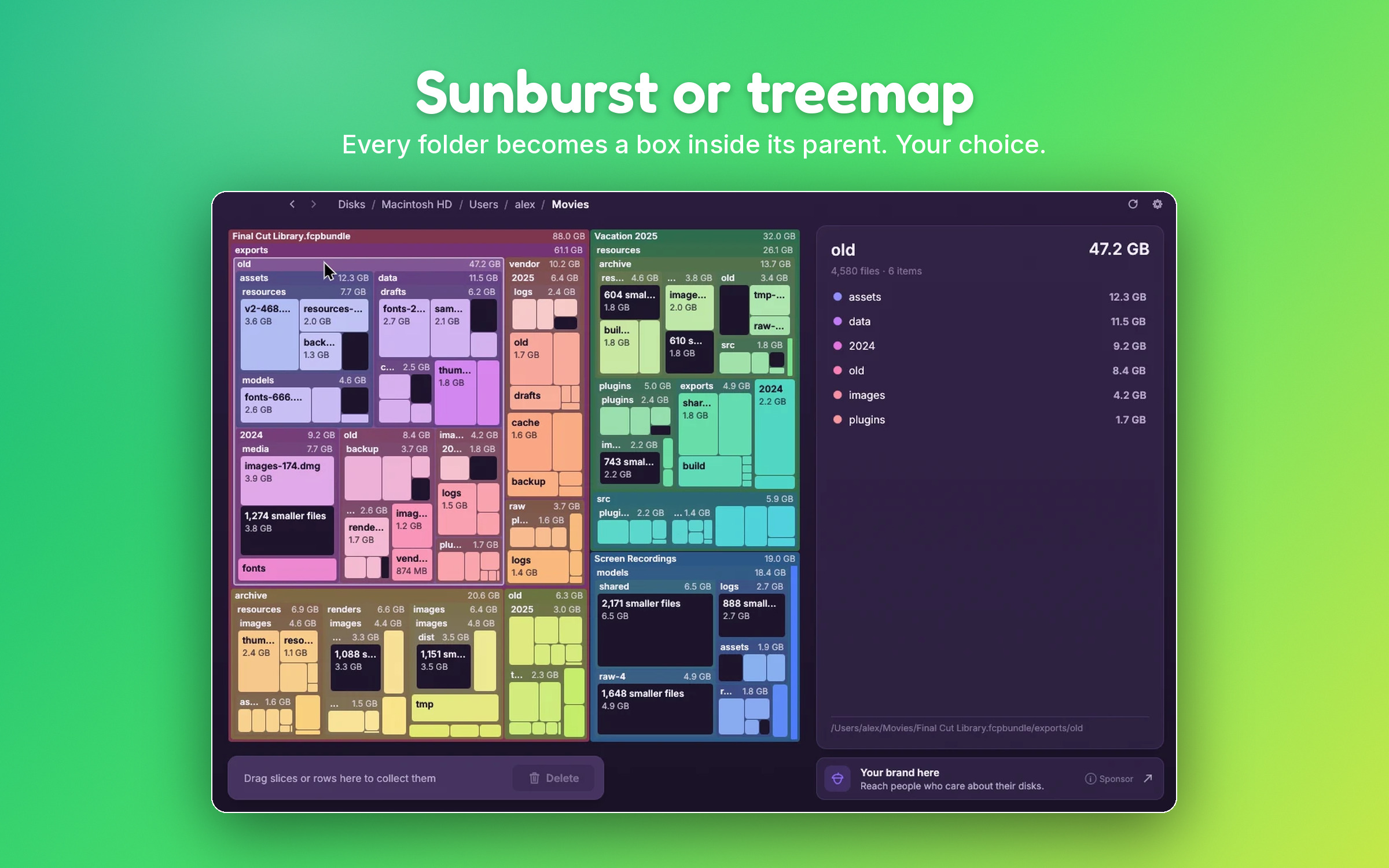
Click a box to zoom in, click the centre or go back to zoom out. The side list shows the biggest items first. Tiny files are grouped so the map doesn't turn into confetti, and you can open the group to see them.
To free space, drag boxes or list rows into the collector. Nothing is deleted yet. Then choose:
- Move to Trash.
- Delete for good.
- Back up to a folder or external drive first, then delete.
- Back up to cloud storage with rclone, then delete.
Like SpaceSniffer, SquirrelDisk keeps the chart up to date when you delete or move files in Finder, Explorer or your file manager. It also:
- shows the real space used on disk;
- counts cloud-only files (iCloud, Dropbox, Google Drive, OneDrive) as zero;
- counts hard links once;
- protects system folders, your home folder and whole drives, and asks for an extra confirmation for app and settings folders.
It's a native Rust app of about 8 MB, with no Electron or web view. It speaks 25 languages and has 7 colour themes.
On Linux
SquirrelDisk ships as an AppImage for x86_64 that runs on X11 and Wayland and updates itself. Make it executable and run it:
chmod +x SquirrelDisk-x86_64.AppImage
./SquirrelDisk-x86_64.AppImage
It reads what your user can read, so folders owned by root may show up smaller than they are. It can also scan a server over SSH without installing anything there. The Linux page covers what usually fills up a Linux disk, from the systemd journal to Docker.
When SpaceSniffer is the better choice
If you're on Windows, SpaceSniffer is a mature, light tool. Pick it when:
- You use filters and tags. SpaceSniffer can filter by name, size or age and lets you tag items with colours. SquirrelDisk has no filters or tags.
- You want a classic treemap with lots of detail. SpaceSniffer shows several levels of nested boxes at once and lets you tune how many.
- You work with NTFS alternate data streams. SpaceSniffer can show them; SquirrelDisk doesn't.
SquirrelDisk makes more sense when you use more than one system, or when you want the backup-then-delete options, or SSH and cloud scanning.
How to get started
- Go to the download page and get the build for your system: a universal
.dmgfor Mac, an AppImage or.tar.gzfor Linux. - Mac: the first time, macOS blocks the app because it isn't signed with an Apple Developer ID. Go to System Settings → Privacy & Security and click Open Anyway.
- Open Settings and choose the treemap if you want the SpaceSniffer look.
- Pick a drive or folder, then drag what you don't need into the collector.
Questions
Is there a SpaceSniffer for Mac?
No. On 5 October 2026 SpaceSniffer 2.2.0.27 was available only for Windows. There is no macOS version.
Does SpaceSniffer work on Linux?
There is no Linux version. SpaceSniffer is a Windows program, and its source code isn't published, so nobody can port it. We haven't tested it under Wine. On Linux, SquirrelDisk, QDirStat, Filelight and GNOME's Disk Usage Analyzer are native alternatives.
Is SpaceSniffer open source?
No. SpaceSniffer is freeware from Uderzo Software: free to use, with donations welcome, but the source code is not available. SquirrelDisk is open source (AGPL-3.0).
What is the closest SpaceSniffer alternative on Mac?
For the treemap look, SquirrelDisk (turn on the treemap in Settings) and GrandPerspective are both free and open source. SquirrelDisk also has a sunburst view and runs on Windows and Linux.
Can I use the same tool on Windows, Mac and Linux?
With SquirrelDisk, yes. It runs on macOS, Windows 10/11 and Linux x86_64 with the same interface. On Windows there is also a portable .exe, like SpaceSniffer.
Try SquirrelDisk
Free and open source, for macOS, Windows and Linux.
v2.5.0 · macOS · Windows · Linux