
SquirrelDisk for Windows
Disk space analyzer for Windows 11 and 10: SquirrelDisk
Find out what is taking up space on your C drive and clean it up safely. Free, open source disk space analyzer for Windows 10 and 11.
Updated 28 September 2026
What SquirrelDisk does on Windows
SquirrelDisk scans a drive and draws every folder as a slice of a sunburst chart, sized by the space it takes. The chart builds up live while the scan runs, so the big folders show up early. Click a slice to zoom in, click the centre to go back. The side list shows what is inside, biggest first. Tiny files are grouped so the chart stays readable. There is also a treemap view if you prefer rectangles.
When you find something you don't need, drag it into the collector at the bottom. Then choose: move it to the Recycle Bin, delete it for good, back it up to a folder first, or back it up to cloud storage and then delete it. Secure erase is optional. On SSDs the drive may keep old blocks for a while, so BitLocker is what really protects your data there.
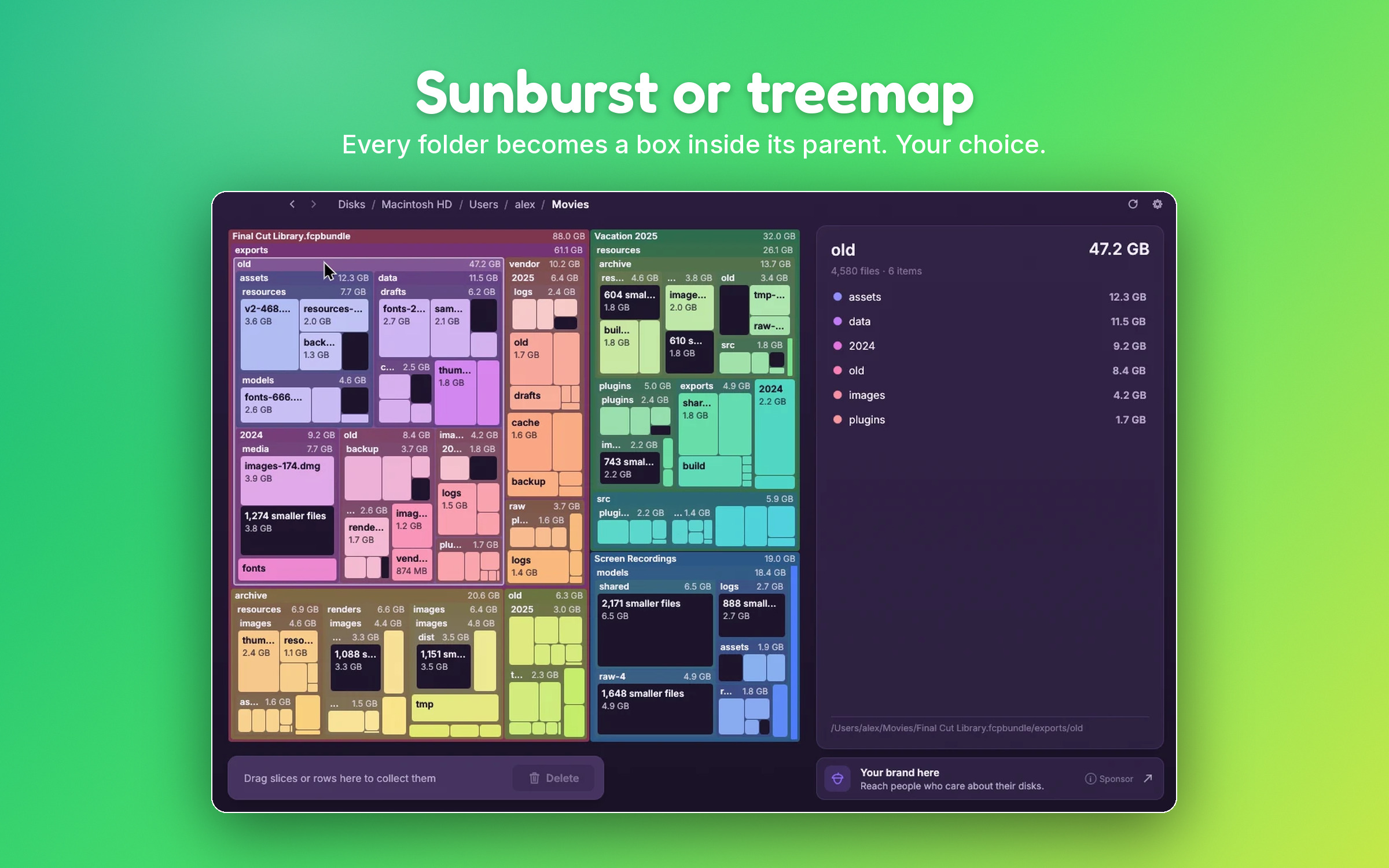
The chart updates by itself when files change in Explorer. Sizes are real space on disk, and hard links are counted once. That matters on Windows, where the system folder uses a lot of them.
What usually takes up space on the C drive
Start with the built-in tools. Open Settings → System → Storage. It lists categories like apps, temporary files and system files, and Cleanup recommendations suggests things to remove. Storage Sense, on the same page, can empty the Recycle Bin and temporary files on a schedule. The classic Disk Cleanup tool still works too: run cleanmgr and click Clean up system files.
These tools cover the common cases. A disk analyzer shows you the rest, folder by folder. Here is what to look for.
WinSxS
C:\Windows\WinSxS stores the Windows components and older versions kept for updates. It often looks huge in Explorer, but a lot of that is hard links counted twice. Never delete files in it by hand. To shrink it, use Disk Cleanup (Windows Update Cleanup) or run DISM /Online /Cleanup-Image /StartComponentCleanup in an admin terminal. SquirrelDisk won't let you collect system folders.
hiberfil.sys and pagefile.sys
These hidden files sit at the root of C. hiberfil.sys holds memory contents for hibernation and Fast Startup. pagefile.sys is virtual memory. Both can be several gigabytes. If you never hibernate, powercfg /hibernate off in an admin terminal removes hiberfil.sys, but it also turns off Fast Startup. Leave the page file to Windows.
AppData
C:\Users\<you>\AppData is hidden by default and can grow large. AppData\Local\Temp is usually safe to clear, though some files may be in use; Storage Sense cleans it too. Other folders belong to apps: browser caches, chat apps, old installers, and sometimes large leftovers from apps you removed. For an app you still use, clear its cache in its own settings. For an app you uninstalled, its leftover folder is usually safe to remove. SquirrelDisk asks for an extra confirmation before collecting app and settings folders.
Downloads
The Downloads folder is easy to forget. Sort it by size and move or delete old installers, zips and videos. Storage Sense can clean it on a schedule, but that is off by default, and for good reason: it deletes files you may still want.
Game libraries
Games are often the biggest thing on a PC, easily 100 GB each. Uninstall them from their launcher (Steam, Epic, Xbox app, and so on) rather than deleting the folder, so the launcher knows they are gone. Most launchers can also move a game to another drive.
Windows.old
After a major Windows update, the previous version is kept in C:\Windows.old so you can go back. Windows removes it by itself after about 10 days. To remove it sooner, go to Settings → System → Storage → Temporary files and tick Previous Windows installation(s). After that you can't roll back.
Install on Windows
- Download the .msi installer, or the portable .exe if you prefer not to install anything. Both work on Windows 10 and 11.
- Run the .msi. It installs for your user only, so it doesn't ask for admin rights.
- If "Windows protected your PC" appears, click More info, then Run anyway. This is because the app is not code-signed. For the portable .exe you can also right-click the file → Properties → tick Unblock → OK. The download page has more detail.
After that, SquirrelDisk updates itself. It is a native app written in Rust, not Electron. It is free and open source (AGPL-3.0), with no account and no analytics. A small sponsor banner inside the app, chosen on your computer, helps keep it free.
Beyond your own PC
SquirrelDisk can also scan a server over SSH, and cloud storage such as S3, Google Drive, Dropbox or FTP through rclone, which it installs with one click. It comes in 25 languages and 7 colour themes.
How it compares
WizTree is a popular Windows tool that reads the NTFS Master File Table directly, which makes scanning NTFS drives very quick. It is free for personal use. If you mainly want a fast list of big files on an NTFS drive, it is a good choice. WinDirStat is a long-standing free, open source tool with a treemap. SquirrelDisk focuses on a clear, interactive chart and a safe cleanup flow, and it works the same way on Mac and Linux.
Questions
Do I need admin rights to install SquirrelDisk?
No. The .msi installs for your user only, so it doesn't need admin rights. There is also a portable .exe that runs from any folder, including a USB stick.
Windows says "Windows protected your PC". Is that safe?
The message appears because the app is not code-signed. Click More info, then Run anyway. For the portable .exe you can also right-click the file → Properties → tick Unblock → OK. The source code is public on GitHub if you want to check it.
Why is WinSxS smaller in SquirrelDisk than in Explorer?
Many files in WinSxS are hard links to files in other Windows folders. Explorer counts them twice. SquirrelDisk counts each hard link once, so the number is closer to the space really used.
Can I delete hiberfil.sys or pagefile.sys with SquirrelDisk?
No, and you shouldn't delete them by hand. They are managed by Windows. You can turn off hibernation with powercfg /hibernate off in an admin terminal, which removes hiberfil.sys. Leave the page file to Windows unless you know why you want to change it.
Do OneDrive files count toward the size?
Only if they are on your PC. Files that are online-only count as zero, because they don't use space on your drive.
Try SquirrelDisk
Free and open source, for macOS, Windows and Linux.
v2.3.1 · macOS · Windows · Linux