
OmniDiskSweeper alternative
OmniDiskSweeper alternative: a visual way to free space on Mac
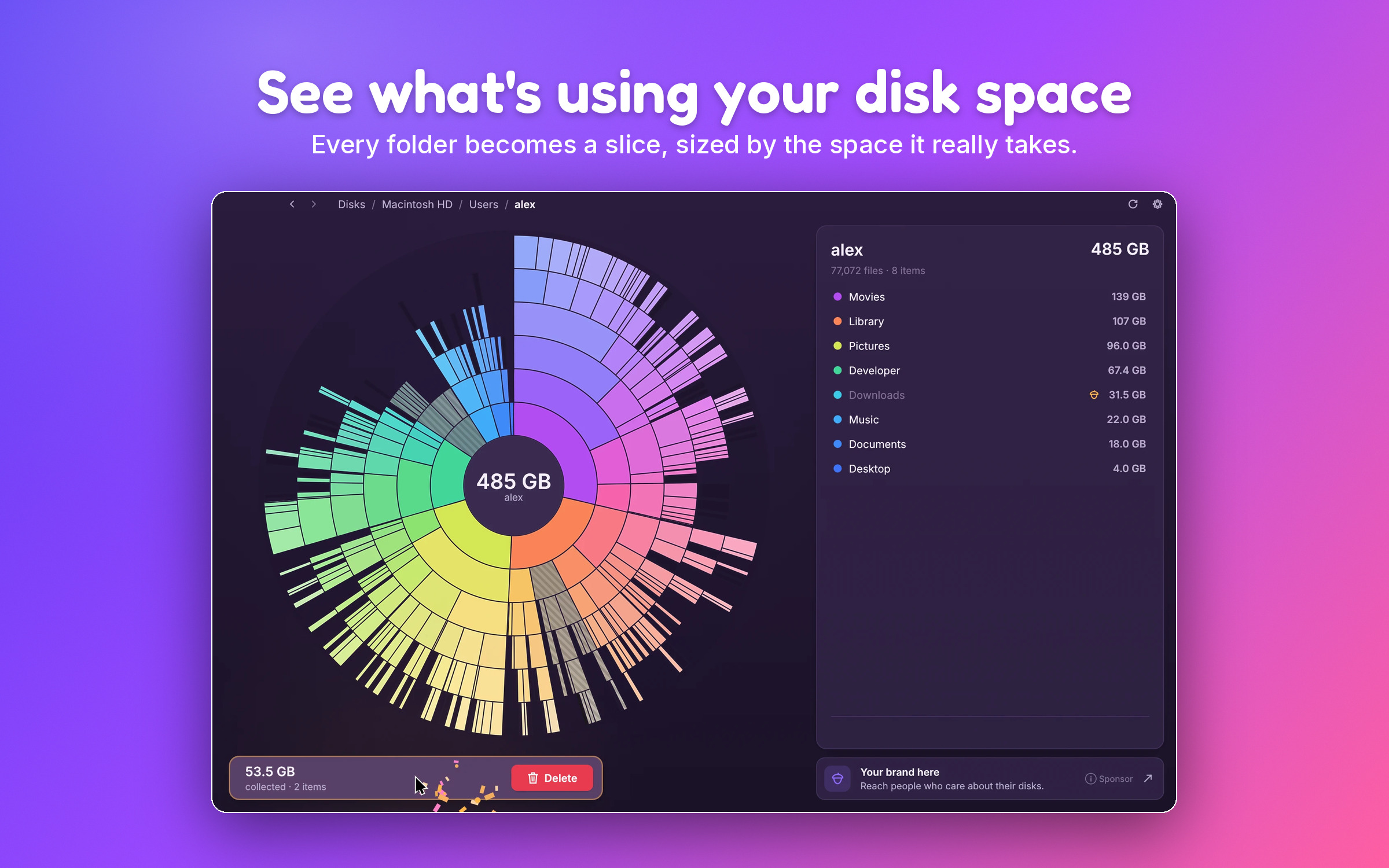
OmniDiskSweeper lists your folders by size. SquirrelDisk draws them as a sunburst or treemap, so the big ones jump out. Free and open source, for Mac, Windows and Linux.
Updated 5 October 2026
The short answer
OmniDiskSweeper is a small, free Mac app from The Omni Group. It lists your folders from biggest to smallest, in columns like Finder's column view, and lets you delete what you don't need. It still works: version 1.16 came out in September 2025 and runs natively on Apple silicon.
What it doesn't do is show you the whole disk at once. You open one column, then the next, then the next. If you'd rather see everything in one picture and spot the big folders at a glance, SquirrelDisk is a free alternative. It draws your disk as a sunburst or a treemap, it is open source, and it runs on macOS, Windows and Linux.
Other options for the Mac:
- GrandPerspective: free and open source, treemap view.
- DaisyDisk: paid ($9.99 one-time), sunburst view. See our DaisyDisk comparison.
- Disk Inventory X: free treemap, but not updated since 2019 and Intel only.
- Finder: in a folder's List view, choose View → Show View Options → Calculate all sizes, then sort by Size.
OmniDiskSweeper vs SquirrelDisk
Checked on 5 October 2026 on omnigroup.com and Wikipedia.
| OmniDiskSweeper | SquirrelDisk | |
|---|---|---|
| Price | Free | Free |
| License | Proprietary freeware | Open source, AGPL-3.0 |
| Latest version | 1.16 (12 September 2025) | 2.5.0 (30 September 2026) |
| Apple silicon | Native | Native (universal app) |
| Platforms | macOS | macOS, Windows 10/11, Linux x86_64 |
| View | Columns sorted by size | Sunburst, or treemap in Settings, plus a list sorted by size |
| Delete workflow | Delete selected items | Collector: Trash, delete, back up first, or cloud backup then delete |
| Protection for system files | Warns for files installed by macOS Installer packages | System folders, your home folder and whole drives can't be collected; app and settings folders need an extra confirmation |
| Servers and cloud storage | Local, external and network drives | Local and external drives, SSH servers, and S3, Google Drive, Dropbox and more through rclone |
| Command line | No | squirreldisk scan <folder> |
Why a picture helps
A list answers "which folder in here is biggest?". A chart answers "where did my space go?" for the whole disk at once.
In OmniDiskSweeper, finding a forgotten 30 GB video export means opening your home folder, then Movies, then the project folder, column by column. In SquirrelDisk, that file is a large slice or box on the first screen, wherever it is. Click it and you're there.
How SquirrelDisk works
Pick a drive or a folder. The sunburst starts drawing straight away and fills in during the scan. The centre is the folder you picked; each ring outwards is one level deeper. Prefer rectangles? Switch to the treemap in Settings.
Click a slice to zoom in and click the centre to go back. The side list shows what's inside, biggest first, so you still get the sorted list you know from OmniDiskSweeper. Tiny files are grouped so the chart stays readable.
When you find something you don't need, drag it into the collector. Nothing is deleted yet. When you're ready, choose:
- Move to Trash.
- Delete for good.
- Back up to a folder or external drive first, then delete.
- Back up to cloud storage with rclone, then delete.
A few details that keep the numbers right on a Mac:
- Real size on disk.
- Files only in iCloud, Dropbox, Google Drive or OneDrive count as zero.
- Hard links are counted once.
- Live updates when you change files in Finder.
It's a native Rust app of about 8 MB. You can start it from Finder (right-click a folder, then Quick Actions → "Scan with SquirrelDisk") or from Terminal with squirreldisk ~/Library.
When OmniDiskSweeper is the better choice
- You like lists more than charts. OmniDiskSweeper's column view is simple and familiar if you live in Finder's column view.
- You want a signed app from a known Mac developer. OmniDiskSweeper comes from The Omni Group. SquirrelDisk builds aren't signed with an Apple Developer ID, so the first launch takes an extra click. See Is SquirrelDisk safe?.
- You're on a very old Mac. Omni still offers older OmniDiskSweeper builds that go back to Mac OS X 10.4.
Not to be confused with DiskSweep
"Disk sweeper" searches also turn up DiskSweep, a different program for Windows from another developer, and some unrelated Android apps. OmniDiskSweeper is Mac only. If you need the same tool on a Mac and a Windows PC, SquirrelDisk works on both, with the same interface.
How to get started
- Go to the download page and get the macOS build (Apple silicon and Intel).
- Open it. The first time, macOS blocks it: go to System Settings → Privacy & Security and click Open Anyway.
- Pick your main drive or your home folder. macOS may ask for access to folders like Documents or Desktop; allow it so the scan is complete.
- Drag what you don't need into the collector, then move it to the Trash or back it up first.
Questions
Is OmniDiskSweeper still available?
Yes. On 5 October 2026 the latest version was 1.16, released on 12 September 2025. It is free and runs natively on Apple silicon. The Omni Group offers it from its Omni Labs page, together with older builds for old macOS versions.
Is OmniDiskSweeper free?
Yes, it has been free since 2009. SquirrelDisk is free too, and open source.
Is there an OmniDiskSweeper for Windows?
No, OmniDiskSweeper is Mac only. A Windows tool called DiskSweep exists, but it's a different program from a different developer. SquirrelDisk runs on Windows and Linux as well as on the Mac.
What's the difference between OmniDiskSweeper and SquirrelDisk?
OmniDiskSweeper shows your disk as columns of folders sorted by size, like Finder's column view. SquirrelDisk shows the whole disk at once as a sunburst or treemap, then lets you collect items and choose to move them to the Trash, delete them, or back them up first.
What is the best free disk space analyzer for Mac?
It depends on how you like to look at your disk. For a sorted list, OmniDiskSweeper is simple and free. For a picture of the whole disk, SquirrelDisk (sunburst or treemap) and GrandPerspective (treemap) are free and open source. DaisyDisk is a polished paid option.
Try SquirrelDisk
Free and open source, for macOS, Windows and Linux.
v2.5.0 · macOS · Windows · Linux