
Disk Inventory X alternative
Disk Inventory X alternative for Apple silicon and modern macOS
Disk Inventory X hasn't been updated since 2019 and runs on Apple silicon only through Rosetta. SquirrelDisk is a free, open source treemap and sunburst disk analyzer that runs natively on M-series Macs.
Updated 5 October 2026
The short answer
Disk Inventory X (often typed "Disc Inventory X") was the go-to free disk map for the Mac for years. It shows your whole disk as a treemap, where every file is a rectangle sized by how much space it takes. But its last release, version 1.3, came out in December 2019. It's an Intel app, so on an Apple silicon Mac it runs through Rosetta 2.
If you want the same idea in an app that is maintained and native on M-series Macs, SquirrelDisk is a good fit. It is free and open source, it shows your disk as a treemap or a sunburst, and it runs on macOS, Windows and Linux.
Other options for the Mac:
- GrandPerspective: free and open source, treemap only. Free from SourceForge, or a small fee on the App Store.
- DiskInventoryY: a newer open source take on Disk Inventory X written in SwiftUI. Early version (0.4.0), needs macOS 14 or later.
- DaisyDisk: paid ($9.99 one-time), sunburst view, very polished. See our DaisyDisk comparison.
- OmniDiskSweeper: free, list view only. See OmniDiskSweeper alternative.
Disk Inventory X vs SquirrelDisk
Checked on 5 October 2026 on Wikipedia, the Disk Inventory X issue tracker and Does It ARM.
| Disk Inventory X | SquirrelDisk | |
|---|---|---|
| Price | Free | Free |
| License | Open source, GPL | Open source, AGPL-3.0 |
| Latest version | 1.3 (8 December 2019) | 2.5.0 (30 September 2026) |
| Apple silicon | Through Rosetta 2 (Intel build) | Native (universal app for Apple silicon and Intel) |
| Platforms | macOS | macOS, Windows 10/11, Linux x86_64 |
| Chart | Treemap | Sunburst, or treemap in Settings |
| Shows results while scanning | No, after the scan | Yes, the chart builds up live |
| File-type statistics | Yes, list of file kinds | No |
| Delete workflow | Move to Trash | Collector: Trash, delete, back up first, or cloud backup then delete |
| Cloud-only files (iCloud, Dropbox) | Not mentioned | Counted as zero, so they don't inflate totals |
| Servers and cloud storage | No | SSH servers, and S3, Google Drive, Dropbox and more through rclone |
| Command line | No | squirreldisk scan <folder> |
How SquirrelDisk works
Pick a drive or a folder. The chart starts drawing straight away and fills in while the scan runs, so the big folders show up in seconds. By default it's a sunburst: the centre is the folder you picked, and each ring outwards is one level deeper. If you miss Disk Inventory X's rectangles, switch to the treemap in Settings. Every folder becomes a box inside its parent, with names and sizes.
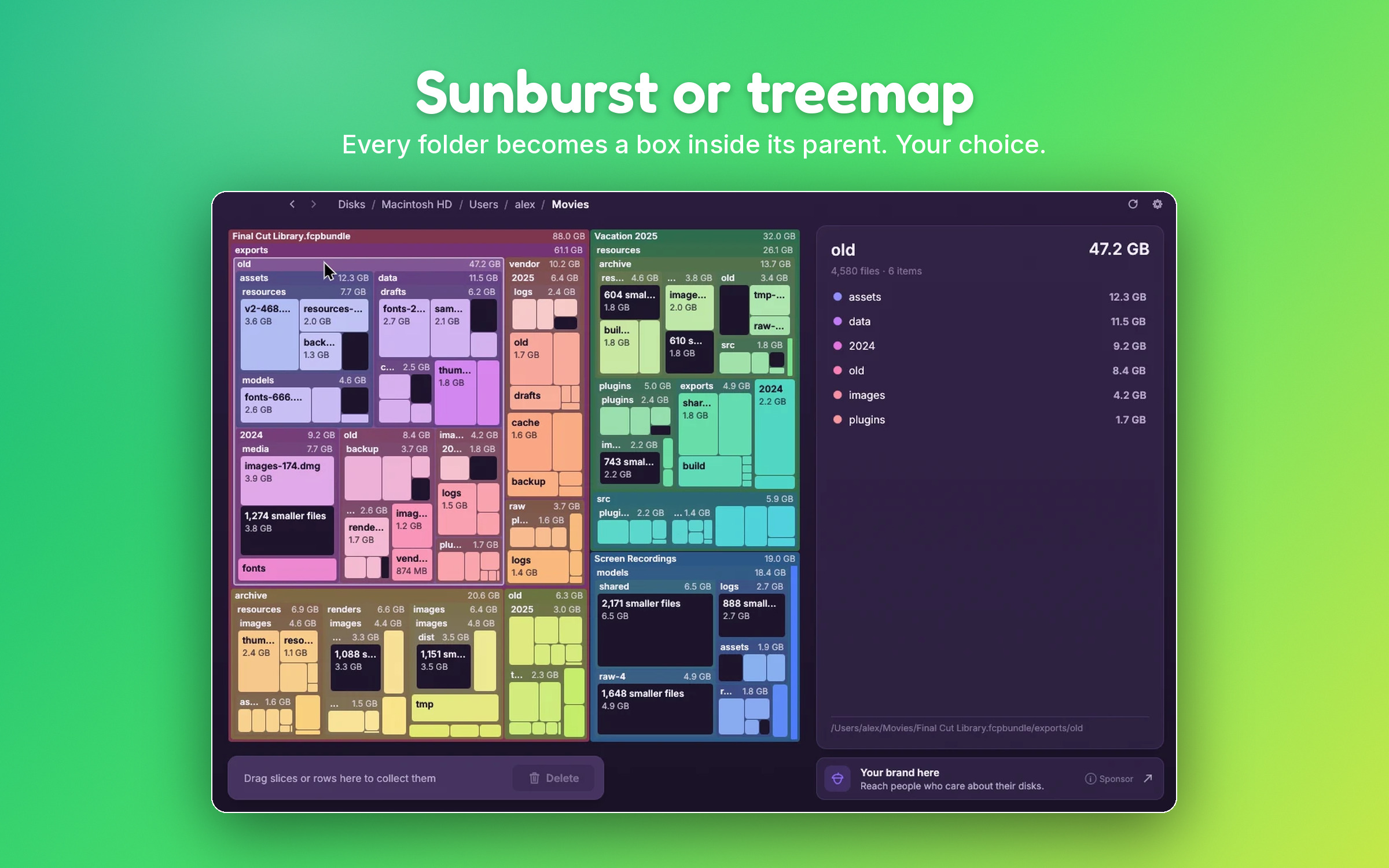
Click any block to zoom in, and click the centre (or go back) to zoom out. The side list sorts the biggest items first. Tiny files are grouped together so they don't turn the map into noise, and you can open the group to see them all.
To free space, drag blocks or list rows into the collector. Nothing is deleted yet. When you're ready, choose:
- Move to Trash.
- Delete for good.
- Back up to a folder or external drive first, then delete.
- Back up to cloud storage with rclone, then delete.
Some details that keep the numbers honest on a modern Mac:
- Real size on disk, not the "logical" size.
- iCloud Drive files that are only in the cloud count as zero, so an "Optimize Mac Storage" folder doesn't look bigger than it is.
- Hard links are counted once.
- Live updates: delete something in Finder and the chart follows.
- Guard rails: system folders, your home folder and whole drives can't be collected. App and settings folders ask for an extra confirmation.
It's a native app written in Rust, about 8 MB, and it maps millions of files with little memory. You can also start it from Finder (right-click a folder, Quick Actions, "Scan with SquirrelDisk") or from Terminal with squirreldisk ~/Downloads.
When Disk Inventory X or another tool is the better choice
- You rely on file-type statistics. Disk Inventory X colours files by kind and lists how much space each kind takes. SquirrelDisk has no breakdown by file type.
- You want a treemap and nothing else. GrandPerspective does one thing, treemaps, and does it well. It is actively maintained.
- You want an App Store app. GrandPerspective and DaisyDisk are on the Mac App Store and signed. SquirrelDisk is not in the App Store, and its builds aren't signed with an Apple Developer ID, so the first launch takes an extra click.
- You need macOS-specific views. DaisyDisk can show and remove local snapshots and breaks down "System Data". SquirrelDisk has no dedicated view for those.
How to switch
- Go to the download page and get the macOS build. It's one universal app for Apple silicon and Intel.
- Drag SquirrelDisk to Applications and open it. The first time, macOS blocks it: go to System Settings → Privacy & Security and click Open Anyway.
- Open Settings and choose the treemap if you want the Disk Inventory X look.
- Pick your main drive or your home folder. macOS may ask for access to folders such as Documents or Desktop; allow it so the scan is complete.
- Drag what you don't need into the collector, then move it to the Trash, or back it up first.
You can then delete Disk Inventory X from Applications. Like most Mac apps, it leaves only a small preferences file behind.
Questions
Is Disk Inventory X still maintained?
Its last release is version 1.3, from 8 December 2019, which added support for macOS Catalina. On 5 October 2026 there had been no newer version, and the request for an Apple silicon build on its issue tracker had no answer from the developer.
Does Disk Inventory X work on M1, M2, M3 or M4 Macs?
It is an Intel-only app, so on Apple silicon it runs through Rosetta 2, Apple's translation layer. It works for many people, but it isn't native, and it depends on Apple keeping Rosetta available.
What is the closest free alternative to Disk Inventory X?
For the same treemap look, SquirrelDisk (with the treemap turned on in Settings) and GrandPerspective are both free and open source. SquirrelDisk also offers a sunburst view and runs on Windows and Linux.
Is there a Disk Inventory X for Windows?
No. On Windows, WinDirStat inspired Disk Inventory X and works in a similar way. SquirrelDisk runs on Windows too, with the same interface as on the Mac.
Why does macOS warn me when I open SquirrelDisk?
SquirrelDisk builds are not signed with an Apple Developer ID. The first time you open it, go to System Settings → Privacy & Security and click Open Anyway. See Is SquirrelDisk safe? for what the app reads and sends.
Try SquirrelDisk
Free and open source, for macOS, Windows and Linux.
v2.5.0 · macOS · Windows · Linux