
DaisyDisk alternative
DaisyDisk alternative: free and open source SquirrelDisk
Looking for a free DaisyDisk alternative? SquirrelDisk shows your disk as an animated sunburst, is open source, and also runs on Windows and Linux.
Updated 28 September 2026
The short answer
DaisyDisk is a well-made, paid Mac app. If you want something similar that is free, SquirrelDisk is a good fit. It draws your disk as an animated sunburst, lets you zoom in by clicking, and lets you collect files before you delete them.
SquirrelDisk is open source (AGPL-3.0). It needs no account and sends no analytics. It shows a small sponsor banner, chosen on your own computer. It also runs on Windows and Linux, so you can use the same tool on every machine you own.
DaisyDisk vs SquirrelDisk
Checked on 28 September 2026 on daisydiskapp.com.
| DaisyDisk | SquirrelDisk | |
|---|---|---|
| Price | $9.99 one-time, up to 5 personal Macs | Free |
| License | Proprietary | Open source, AGPL-3.0 |
| Platforms | macOS 10.13 or newer (Apple silicon, Intel) | macOS (Apple silicon, Intel), Windows 10/11, Linux x86_64 |
| Where to get it | Its own store and the Mac App Store | Download page (no App Store version) |
| Latest version | 4.34.2 (10 July 2026) | 2.3.0 |
| Chart | Sunburst | Sunburst, or treemap in Settings |
| Delete workflow | Drag items to a collector, then delete | Drag items to a collector, then Trash, delete, back up first, or cloud backup then delete |
| Cloud storage | Dropbox, Google Drive, OneDrive, Box | S3, Google Drive, Dropbox, FTP and many more, through rclone |
| Remote servers over SSH | Not listed on its site | Yes, using your ssh config |
| macOS snapshots and "System Data" breakdown | Yes | No dedicated view |
| Code signing | Signed, and on the Mac App Store | Not code-signed; first launch needs Open Anyway |
How SquirrelDisk works
Open SquirrelDisk and pick a drive or folder. The sunburst starts drawing right away and fills in while the scan runs. The inner ring is the folder you chose. Each ring further out is one level deeper. If you prefer rectangles, switch to the treemap in Settings.
Click a slice to zoom into that folder. Click the centre to go back up. The list on the side shows the biggest items first, so the answer to "what is using my space" is usually at the top. Very small files are grouped together so they don't clutter the chart.
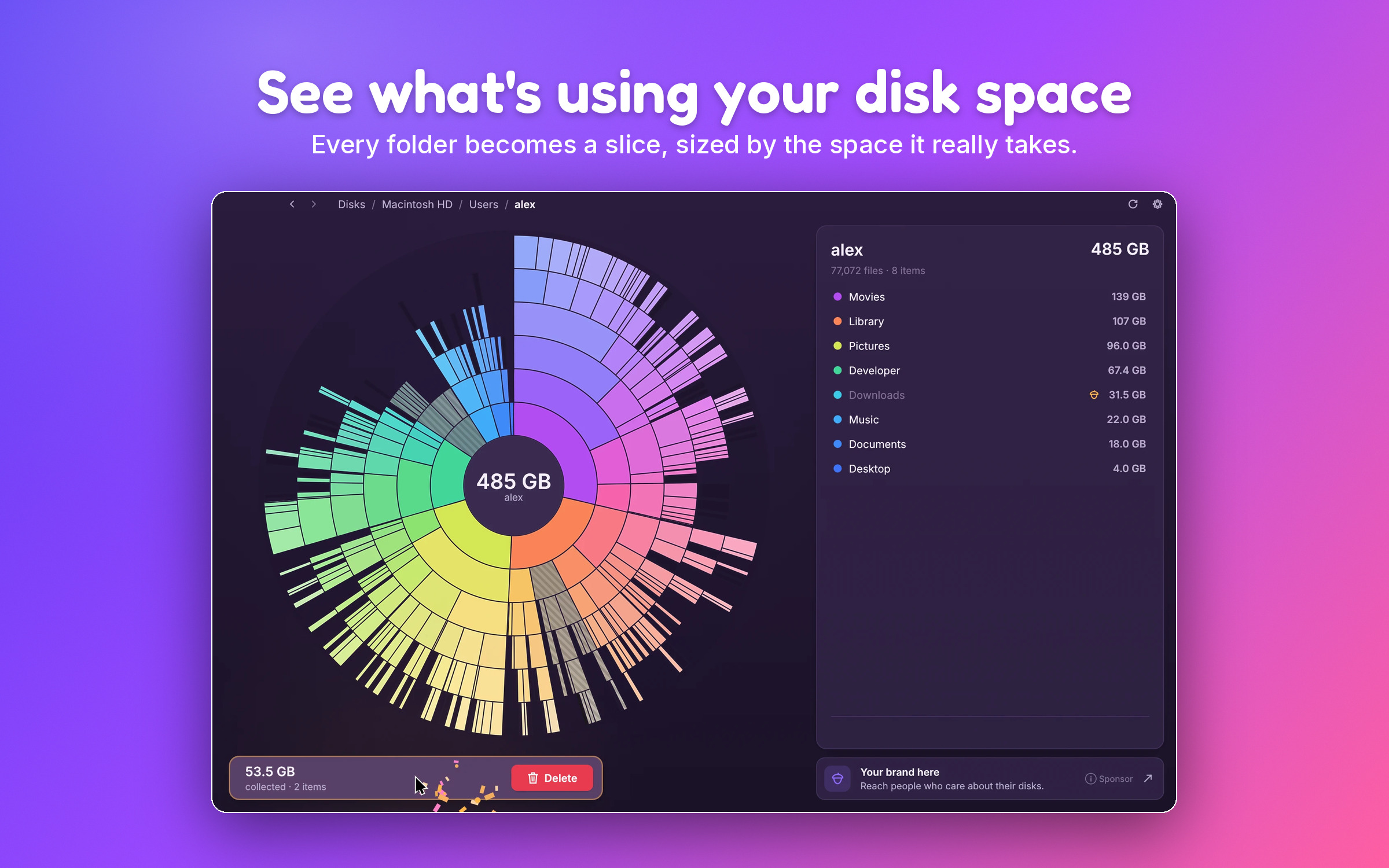
When you find something you don't need, drag the slice or the list row into the collector. Nothing is deleted yet. When you are ready, you choose what happens:
- Move to Trash.
- Delete for good.
- Back up to a folder or external drive first, then delete.
- Back up to cloud storage with rclone, then delete.
There is also an optional secure erase (3 passes, DoD 5220.22-M). Be aware that SSDs and APFS may keep old copies of blocks, so overwriting is not a guarantee. Full-disk encryption (FileVault on a Mac) is what really protects deleted data.
A few details help you trust the numbers:
- Real space on disk. Sizes are what the files actually use on disk.
- Cloud-only files count as zero. Files in iCloud, Dropbox, Google Drive or OneDrive that are not downloaded don't inflate the total.
- Hard links are counted once.
- Live updates. If you move or delete files in Finder, the chart updates.
- Guard rails. System folders, your home folder and whole drives can't be collected. App and settings folders ask for an extra confirmation.
SquirrelDisk can also scan a remote server over SSH (see SSH scanning) and cloud storage through rclone (see cloud scanning). It comes in 25 languages and 7 colour themes, has optional sounds, and updates itself.
It is a native app written in Rust with egui. There is no Electron and no web view. SquirrelDisk 2 is a from-scratch rewrite by the original author, who started the project in 2022.
When DaisyDisk is the better choice
DaisyDisk has been around for a long time and it shows. Choose it if:
- You want a Mac App Store app. DaisyDisk is on the Mac App Store and is signed. SquirrelDisk is not in the App Store and its builds are not code-signed, so the first launch takes an extra step.
- You care most about polish. DaisyDisk's interface is refined and consistent with macOS.
- You need macOS-specific tools. DaisyDisk can list and purge macOS snapshots and gives a breakdown of "System Data". SquirrelDisk has no dedicated view for these.
- You want a one-time purchase with support. $9.99 buys a lifetime license with minor updates and a 30-day money-back guarantee.
SquirrelDisk also does not have a duplicate finder or a "smart cleanup" of caches. It shows you where the space goes and lets you decide.
How to get started
- Go to the download page and get the macOS build. It works on Apple silicon and Intel.
- Open the app. The first time, macOS will block it: go to System Settings → Privacy & Security and click Open Anyway.
- Pick your main drive or a folder such as your home folder, and watch the sunburst build up.
- Drag what you don't need into the collector, then move it to the Trash or back it up first.
You don't need SquirrelDisk to find large files on a Mac. You can also use Finder (sort a folder by size with View → Show View Options → Calculate all sizes), or run du -sh ~/* | sort -h in Terminal. A visual tool just makes the big items easier to spot.
Questions
Is there a free alternative to DaisyDisk?
Yes. SquirrelDisk is free and open source (AGPL-3.0). It has a sunburst chart like DaisyDisk, plus an optional treemap. GrandPerspective is another free, open source option for Mac, with a treemap only.
Is DaisyDisk a subscription?
No. On 28 September 2026 DaisyDisk cost $9.99 as a one-time purchase, for up to 5 personal Macs. It is sold on its own site and on the Mac App Store.
Does SquirrelDisk work on Apple silicon?
Yes. SquirrelDisk runs natively on Apple silicon and Intel Macs. It also runs on Windows 10/11 and Linux x86_64.
Why does macOS warn me when I open SquirrelDisk?
SquirrelDisk builds are not code-signed. The first time you open it, go to System Settings → Privacy & Security and click Open Anyway. The download page has step-by-step details.
Can SquirrelDisk scan cloud storage like DaisyDisk?
Yes, through rclone, which SquirrelDisk can install with one click. That covers S3, Google Drive, Dropbox, FTP and many more. It can also scan servers over SSH.
Try SquirrelDisk
Free and open source, for macOS, Windows and Linux.
v2.3.1 · macOS · Windows · Linux