
Find duplicate photos and videos across your disks, and keep the right copy
SquirrelDisk 2.6 adds a duplicate finder. It compares folders, external drives, servers and cloud storage by content, shows how much space you get back, and lets rules decide which copy stays.
Published 18 October 2026
Duplicates pile up quietly. You import a memory card, then import it again a month later into a different folder. You copy a project folder to an external SSD "just in case", then keep working on both. Your phone backs up to the cloud and to your Mac. None of it is a mistake on its own, but on a disk full of photos and 4K video it adds up to tens or hundreds of gigabytes.
SquirrelDisk 2.6 adds a duplicate finder for exactly this. It's on the home screen, under Tools.
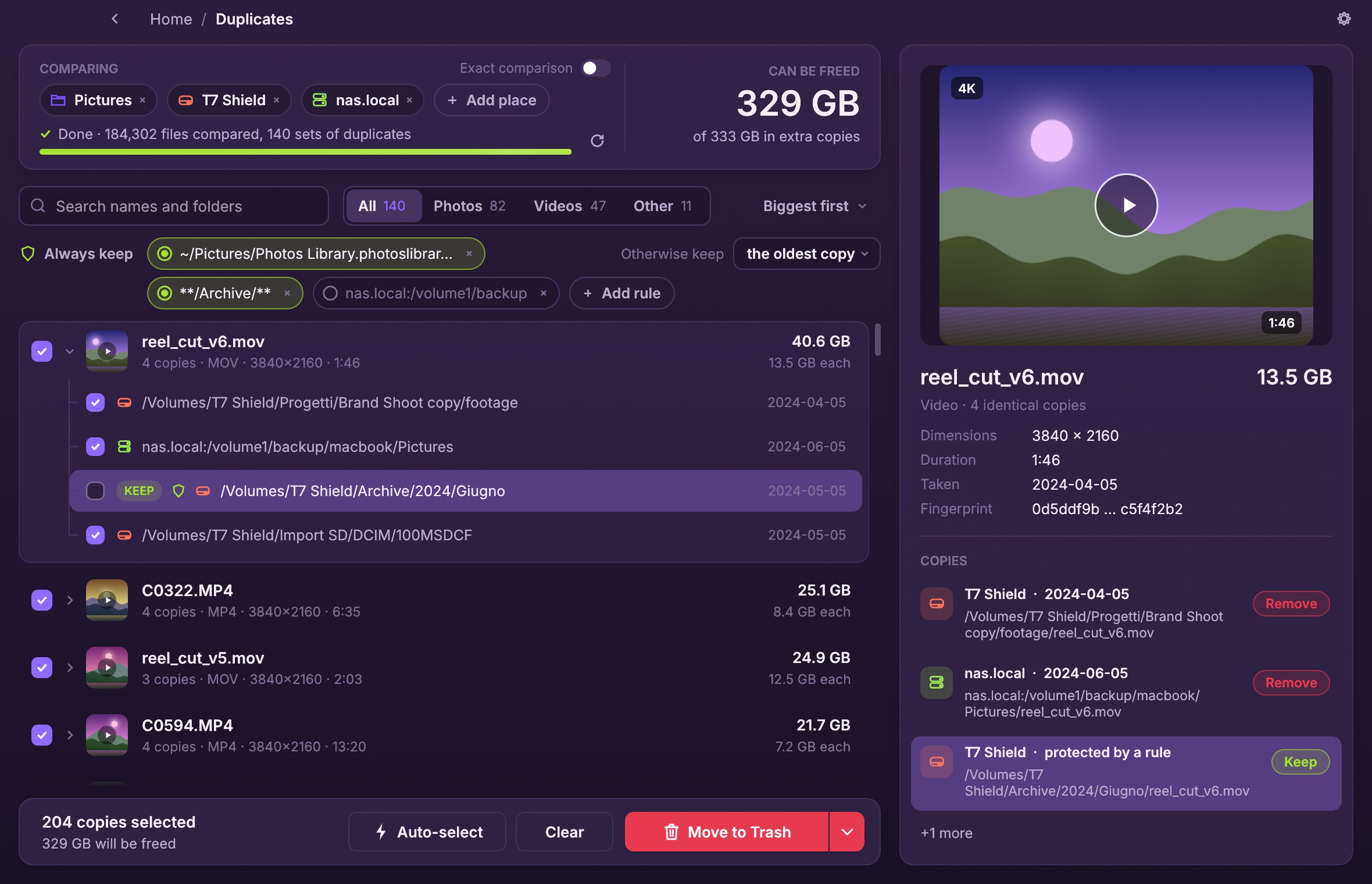
Compare places, not just folders
Duplicates rarely sit side by side. More often the copy is on another drive. So the first thing you do is add the places to compare:
- Folders on your computer, as many as you like.
- Disks: your startup disk, an external SSD, an SD card.
- Servers you reach over SSH, such as a NAS.
- Cloud storage through rclone: Google Drive, S3, Dropbox and many more.
Press Find duplicates and the results start appearing while the scan is still running, biggest savings first. At the top you see how much space you can get back.
How it decides two files are the same
Two files are duplicates when their content is identical, whatever they are called. Checking that by reading every byte of every file would take a long time, so the search narrows things down step by step:
- Same size. Files of different sizes can't be identical, so a file with a size no other file has is never opened. On a typical disk, that is most files.
- Same beginning and end. For files that share a size, it reads the first and last 64 KB. Different photos and videos almost always differ here already.
- Same content. What is left gets a fingerprint sampled across the whole file: the beginning, the end and dozens of spots in between, at most about 2 MB even for a very large video. Files up to 4 MB are read entirely.
For photos and videos this is reliable in practice, because any edit or new export changes bytes throughout the file. If you want certainty anyway, turn on Exact comparison. It reads every byte of big files, which is much slower on large videos and slow SD cards.
On cloud storage, SquirrelDisk uses the MD5 or SHA-1 the provider already reports, so a photo on your Mac can be matched with its copy on Google Drive without downloading it. Fingerprints of local files are remembered between runs, so comparing again is quick.
A few details keep the numbers honest:
- Hard links (one file with two names) are counted once: deleting one frees nothing.
- APFS clones (made by Finder's Duplicate or
cp -c) share their data. They are marked, and removing them doesn't count as freed space. - Cloud-only placeholders (iCloud, Dropbox and other files not downloaded) are skipped, so nothing gets downloaded by accident.
Keep the right copy
Finding duplicates is the easy part. The hard part is that the copy you want to keep is not always the same one. The picture in your Photos library should stay; the one in Downloads can go. The original footage on the archive drive should stay; the copy inside Brand Shoot copy can go.
For each set, SquirrelDisk picks one copy to keep and checks the others for removal. You decide how it picks:
- Always keep rules, for folders that should never lose a file. Type a folder like
~/Pictures, or a pattern like**/Archive/**, and every copy inside it is kept. Rules can be turned off without deleting them. - Otherwise keep the oldest copy, the newest one, or the one with the shortest path.
- Your own choice always wins: tick or untick any copy, and the rules leave that set alone.
Files inside app libraries such as Photos or Final Cut Pro are always kept. They are still listed, so the copies elsewhere are found.
Click a set to see a preview on the right: photos, RAW files and videos come from Quick Look on a Mac, along with dimensions, duration, camera and the full path of every copy. Double-click a copy to show it in Finder.
Removing copies safely
When the selection looks right, choose Move to Trash, or open the menu next to it for Delete permanently. Before anything is removed:
- At least one copy of every file must remain. A set where every copy is checked can't be removed.
- The copy being kept is checked: it must still be there with the same size.
- Each copy being removed must still be the file that was compared, with the same size and modification date. Anything changed since the scan is left alone.
Servers and cloud storage have no Trash, so copies there are always deleted for good; the confirmation says so and asks you to tick a box first.
Without SquirrelDisk
You don't need an app to find duplicates. On a Mac, in Terminal, this prints every extra copy in a folder (each file whose content matches one listed before it):
find ~/Pictures -type f -size +100k -exec md5 -r {} + | sort | awk '{ if ($1 == prev) print; prev = $1 }'
On Linux use md5sum instead of md5 -r. The command-line tools fdupes and jdupes do the same job with more options, and dupeGuru is a free app for Mac, Windows and Linux. A visual tool mostly helps with the decisions that come after: which copy to keep, and how much space you get back.
Questions
How does SquirrelDisk know two files are duplicates?
By their content, never by their name. Files are first grouped by exact size; only files that share a size are read. Then it compares the first and last 64 KB, and finally a sampled fingerprint of the whole file (small files are read entirely). Turn on Exact comparison to read every byte instead.
Does it find a photo that was renamed?
Yes. Names play no part, so IMG_0001.HEIC in your Photos library and Beach.heic on a backup drive are found as copies if their content is identical.
Can it compare my Mac with an external drive or a NAS?
Yes. Add any mix of folders, mounted disks, servers over SSH and cloud storage through rclone. Copies are found across all of them at once.
Will it delete files from my Photos or Final Cut library?
No. Files inside app libraries (Photos, Final Cut Pro, iMovie, Lightroom previews and similar) are listed, so copies elsewhere are found, but they are always kept: removing a file from inside a library would break it.
Is the duplicate finder free?
Yes, like the rest of SquirrelDisk. It is open source under the AGPL-3.0 license.
Try SquirrelDisk
Free and open source, for macOS, Windows and Linux.
v2.6.1 · macOS · Windows · Linux