
Is SquirrelDisk safe? What it reads, and what it never touches
SquirrelDisk is free, open source and scans your disk on your own computer. Here is exactly what it reads, what it sends over the network, how deleting works, and how to check all of it yourself.
Published 5 October 2026
Short answer: yes. SquirrelDisk is a free, open source disk space analyzer. It scans your disk on your own computer, it never opens your files, and it never uploads anything about them. It doesn't need an account or administrator rights. Nothing is deleted until you ask for it and confirm.
You shouldn't have to take that on trust, though. A disk analyzer looks at every folder you own, so it is fair to ask what it does with that view. This page explains it in detail and shows you how to check each point yourself.
What SquirrelDisk reads
To draw the chart, SquirrelDisk walks through the folders you pick and asks the operating system for each item's:
- name and path, to show it in the chart and the list;
- size on disk, to size each slice;
- type (file, folder or link), so that linked folders are counted once.
That is file system metadata, the same thing Finder, Explorer or du read to show folder sizes. SquirrelDisk does not open files to read what's inside them. A 2 GB video and a 2 GB database look the same to it: a name and a size.
The map of your disk stays in memory while the app is open. It is not saved to a file or sent anywhere.
What it sends over the network
SquirrelDisk works offline. When it is online, it makes only these requests (the privacy policy has the full detail):
| Request | When | What it contains |
|---|---|---|
| Update check, to GitHub | At launch, can be turned off in Settings | A request for the latest release |
Sponsor list, squirreldisk.com/ads.json | At launch | App version, operating system and CPU type. Everyone receives the same list |
| Sponsor click | Only when you click the banner, and only with anonymous stats on | The ad id and where the banner was shown |
| Daily view totals | At most once a day, only with anonymous stats on | How many times each banner was shown. No identifier |
That's all. No file names, folder names, sizes or disk contents are part of any request. Like any web server, ours sees your IP address when the app downloads the sponsor list. It is used to count launches and daily users, turned into a code that changes every month, and never stored.
The sponsor banner is chosen on your computer. After a scan, the app may work out broad interests (for example "photo and video") from folder names already in memory. Those interests never leave your computer: they are only used to pick one banner from the list everyone downloads. You can turn off Personalized sponsors and Anonymous sponsor stats in Settings.
Two features connect to other places, and only when you use them:
- Remote servers connect over SSH to the server you choose, with your own
sshsetup. See SSH scanning. - Cloud storage goes through rclone. If you ask SquirrelDisk to install it, it downloads the official build from downloads.rclone.org. Your cloud accounts are stored by rclone on your computer. See cloud scanning.
Permissions on macOS, Windows and Linux
SquirrelDisk doesn't ask for administrator rights on any system. It runs as your normal user.
- macOS. The first time a scan reaches folders such as Desktop, Documents or Downloads, macOS may ask whether SquirrelDisk can access them. Some locations, like Mail or Safari data, are protected by macOS and stay hidden unless you add SquirrelDisk under System Settings → Privacy & Security → Full Disk Access. You don't have to: the rest of the disk is scanned either way.
- Windows. No UAC prompt. Folders your account can't open are skipped.
- Linux. It reads what your user can read. Folders owned by root, such as parts of
/var, may show up smaller than they are.
How deleting works
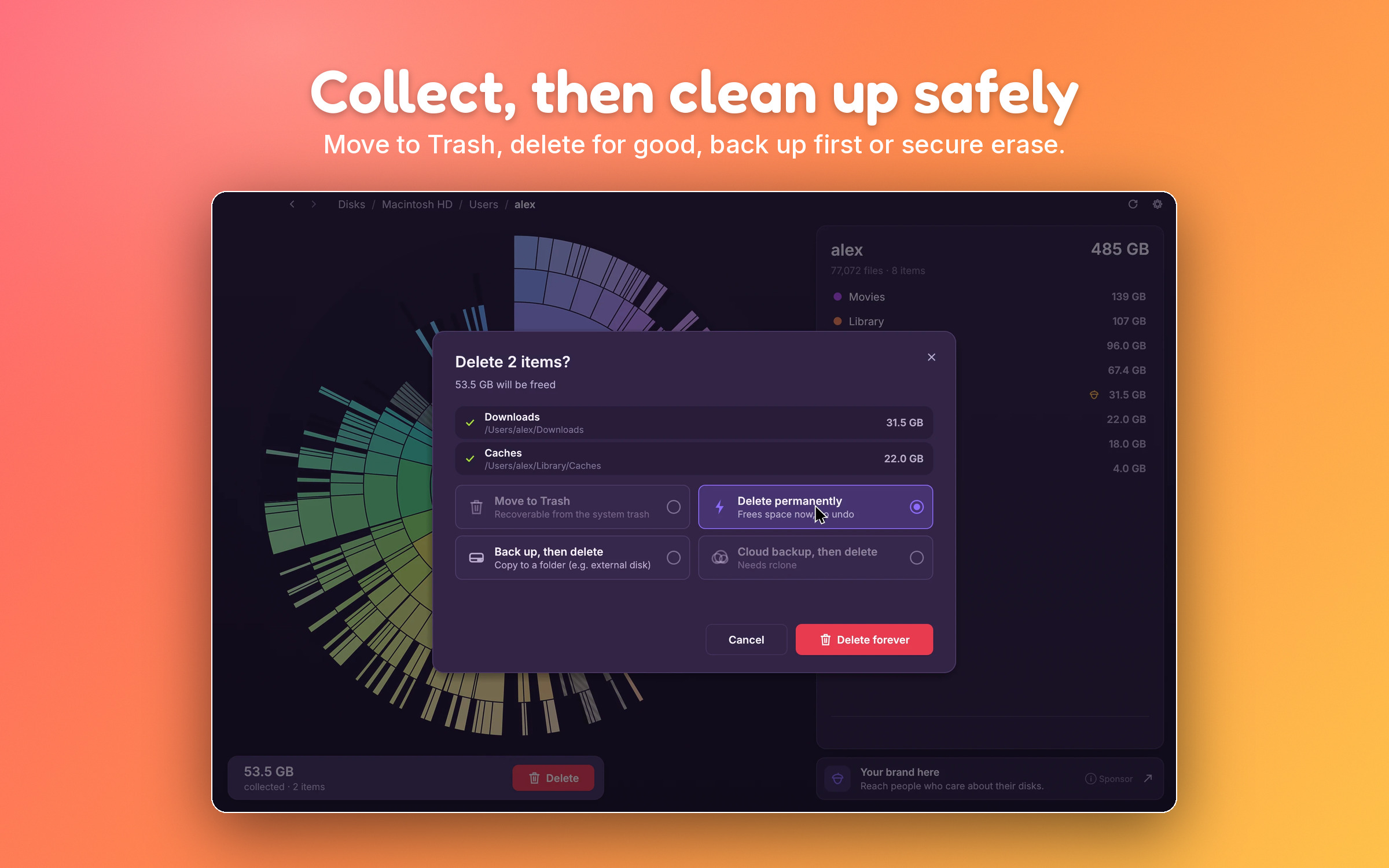
Scanning never changes anything. Deleting is a separate step you always start yourself:
- You drag slices or list rows into the collector at the bottom of the window. Nothing happens to the files yet.
- You choose what to do with them: move to Trash, delete for good, back up to a folder or drive first, or back up to cloud storage first, then delete.
- You confirm.
Moving to the Trash is the safe choice: you can still restore everything from the Trash or Recycle Bin.
SquirrelDisk also has guard rails that you can't switch off:
- Never allowed: whole drives, system folders (
/System,/usr/bin,C:\Windows,C:\Program Files\WindowsAppsand similar), your home folder, its main folders (Documents, Desktop, Downloads, Pictures and so on), and sensitive places like~/.sshor your keychains. SquirrelDisk also refuses to delete itself. - Extra confirmation: app and settings folders such as
/Applications,~/Library,~/.config,AppDataorC:\Program Files.
Open source: check it yourself
SquirrelDisk is released under the AGPL-3.0 license, and the whole app is on GitHub:
- Everything the app sends about sponsors is defined in one file you can read, linked from the privacy policy.
- The guard rails above are a list of paths in the source code, with tests.
- Release builds are made by a GitHub Actions workflow that lives in the same repository, so you can see how each download was built. You can also skip our builds and compile it yourself with
cargo run --release.
Why macOS or Windows show a warning
SquirrelDisk builds are not signed with a paid Apple Developer ID or a Windows code-signing certificate, and the Mac app is not notarized by Apple. So the first launch shows a warning:
- macOS says it can't verify the app. Go to System Settings → Privacy & Security and click Open Anyway.
- Windows shows "Windows protected your PC". Click More info, then Run anyway.
These warnings mean the system doesn't know the publisher. They don't mean malware was found. If you'd rather check, upload the file to VirusTotal before opening it. Unsigned new releases sometimes get a false positive from one or two lesser-known engines. If that happens, please open an issue.
How to download it safely
Get SquirrelDisk from one of two places:
- the download page on squirreldisk.com;
- the releases page on GitHub.
The download page links to the same GitHub files. Avoid copies on download portals: you can't tell whether they were changed. Once installed, SquirrelDisk updates itself from GitHub.
How it compares
| SquirrelDisk | WizTree | WinDirStat | DaisyDisk | |
|---|---|---|---|---|
| Source code public | Yes (AGPL-3.0) | No | Yes (GPLv2) | No |
| Account needed | No | No | No | No |
| Scans locally | Yes | Yes | Yes | Yes |
| On the Mac App Store | No | No | No | Yes |
| Platforms | macOS, Windows, Linux | Windows, macOS | Windows | macOS |
If a signed app from the Mac App Store matters most to you, DaisyDisk is a good choice; see our DaisyDisk comparison. If you want to read every line that runs on your computer, SquirrelDisk and WinDirStat let you do that.
Questions
Is SquirrelDisk a virus?
No. SquirrelDisk is an open source disk space analyzer (AGPL-3.0). The code is public on GitHub, and every release is built from that code by a public GitHub Actions workflow. Download it only from squirreldisk.com/download or the GitHub releases page.
Does SquirrelDisk upload my files?
No. Scans run on your computer. File contents are never opened, and file names, sizes and the map of your disk are never sent anywhere. The privacy policy lists the few requests the app makes.
Why do macOS and Windows warn me when I open it?
Because the builds are not signed with a paid Apple Developer ID or a Windows code-signing certificate. The warning means the system doesn't know the publisher, not that something harmful was found. The download page explains how to open it.
Does SquirrelDisk need administrator rights?
No. It runs as your normal user and reads what your account can read. Folders you don't have access to are skipped, so their size may be missing from the total.
Can SquirrelDisk delete system files by mistake?
Nothing is deleted until you collect items and confirm. System folders, whole drives, your home folder and its main folders can't be collected at all, and app and settings folders ask for an extra confirmation.
Is SquirrelDisk really free?
Yes. There is no paid version, trial or account. A small sponsor banner inside the app helps pay for development. The banner is picked on your computer, and you can turn off personalization and stats in Settings.
Try SquirrelDisk
Free and open source, for macOS, Windows and Linux.
v2.5.0 · macOS · Windows · Linux