
Disk Drill alternative
Disk Drill vs SquirrelDisk: duplicate finders and disk space tools compared
Disk Drill is a data recovery app with a free duplicate finder and disk cleanup. SquirrelDisk is a free, open source disk space app with a duplicate finder that works across disks, servers and cloud storage. Here's how they compare.
Updated 18 October 2026
The short answer
Disk Drill and SquirrelDisk overlap less than their feature lists suggest. Disk Drill is a data recovery app first: its paid version gets back deleted files and damaged drives, and it comes with free extras, including a duplicate finder and a disk cleanup view. SquirrelDisk is a disk space app: it shows what is using your space as a chart, finds duplicates and helps you clean up safely. It is free and open source, and runs on macOS, Windows and Linux.
If you only want to find duplicate photos and videos and free up space, both will do the job. SquirrelDisk can also compare servers and cloud storage, lets rules decide which copy stays, and costs nothing. If you need to recover files, SquirrelDisk can't help, and Disk Drill can.
Disk Drill vs SquirrelDisk
Checked on 18 October 2026 on cleverfiles.com.
| Disk Drill | SquirrelDisk | |
|---|---|---|
| Main purpose | Data recovery | Disk space: see it, find duplicates, clean up |
| Price | Free tools; PRO lifetime license €119 or €69 per year (prices shown in euros on our visit), up to 3 devices | Free |
| License | Proprietary | Open source, AGPL-3.0 |
| Platforms | macOS 10.15–26 (latest 6.3, July 2026); separate Windows edition | macOS (Apple silicon, Intel), Windows 10/11, Linux x86_64 |
| Duplicate finder | Yes, free on Mac | Yes, free on every platform |
| How duplicates are matched | Not described on its site | By content: size, then first and last 64 KB, then a sampled fingerprint; optional exact byte-by-byte comparison |
| Where it looks for duplicates | Folders, internal and external drives | Folders, internal and external drives, servers over SSH, cloud storage through rclone, all compared together |
| Choosing the copy to keep | Auto-select, keep newest or keep oldest | "Always keep" folder rules and patterns, then oldest, newest or shortest path; manual choices win |
| Preview | Yes | Photos, RAW and videos (Quick Look on Mac), with dimensions, duration and camera |
| Removing duplicates | Remove selected | Move to Trash or delete permanently; checks a copy stays and nothing changed since the scan |
| Disk space chart | Mac Cleanup view | Sunburst or treemap of the whole disk |
| Data recovery | Yes (PRO) | No |
| First launch on a Mac | Standard | Not code-signed; needs Open Anyway once |
Finding duplicates with SquirrelDisk
Open Find duplicates from the home screen and add the places to compare: folders, your startup disk, an external SSD or SD card, a NAS over SSH, or cloud storage through rclone. Copies are found across all of them at once, which is where most duplicates live: the same card imported on your Mac and on a backup drive, or a project folder copied to an external disk.
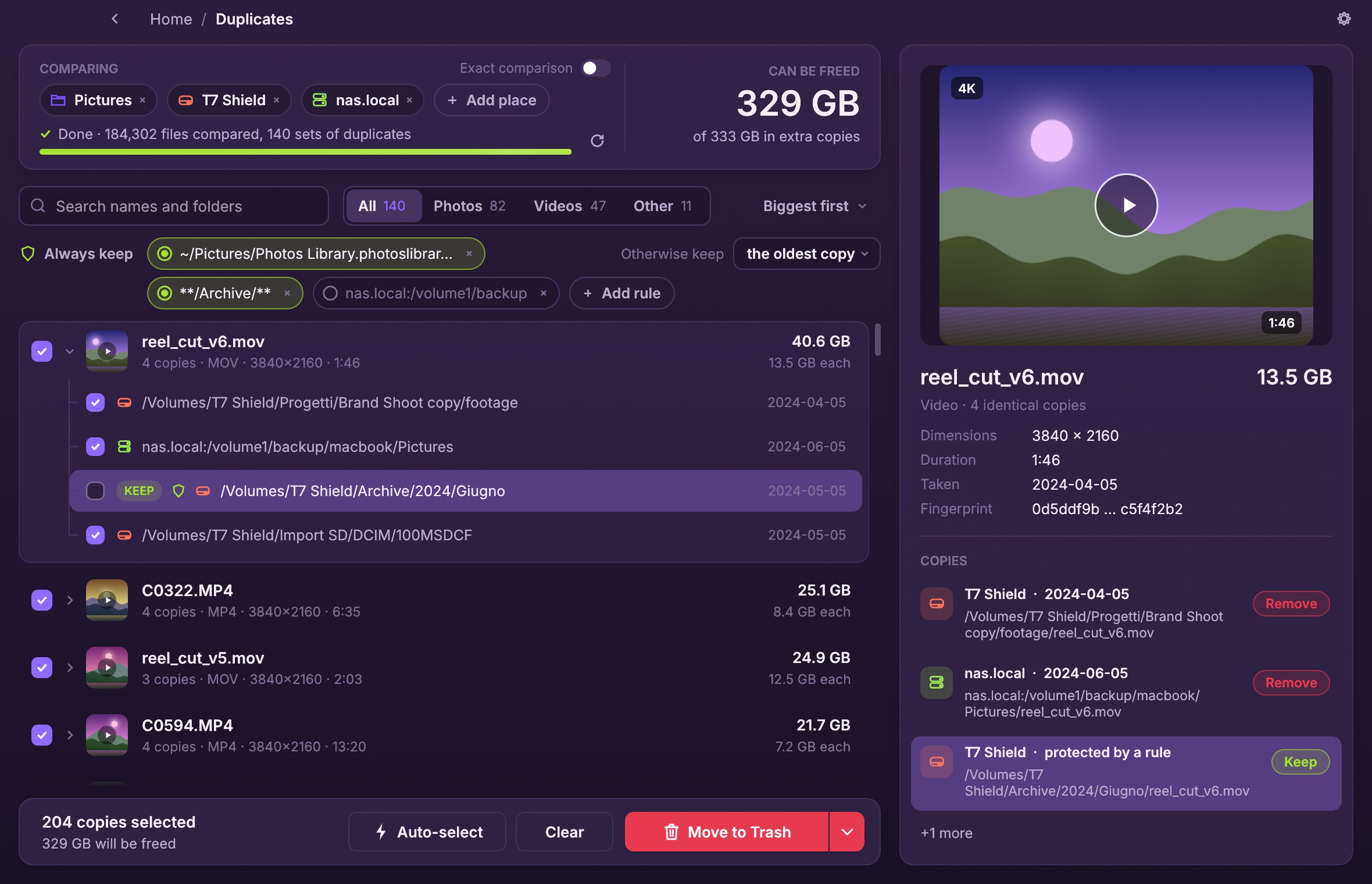
Files are compared by content, so renamed copies are found too. Results appear while the scan is still running, biggest savings first, with the total space you can get back at the top.
For each set, one copy is kept and the others are checked for removal. "Always keep" rules protect folders such as ~/Pictures or patterns such as **/Archive/**; otherwise the oldest copy, the newest, or the one with the shortest path is kept. Files inside app libraries (Photos, Final Cut Pro and similar) are never removed, because that would break the library.
Before removing anything, SquirrelDisk checks that the copy being kept is still there and that each copy being removed hasn't changed since the scan. Local files go to the Trash unless you choose to delete them permanently.
The blog post about the duplicate finder explains how it works in more detail.
When Disk Drill is the better choice
- You need to recover files. This is what Disk Drill is built for: deleted files, formatted cards, damaged drives. SquirrelDisk has no recovery features.
- You want one app for recovery, backups and disk health. Disk Drill's free tools include S.M.A.R.T. monitoring, byte-to-byte backups and a bootable recovery drive.
- You want a commercial app with support. Disk Drill is backed by a company. SquirrelDisk is an open source project maintained by its original author, and its builds aren't code-signed, so the first launch on a Mac takes an extra step.
SquirrelDisk is the better fit if you want a free, open source tool, if you use Windows or Linux as well as a Mac, or if your duplicates are spread across a NAS or cloud storage.
Without either app
On a Mac, the command line can find duplicates too. This prints every extra copy in a folder (each file whose content matches one listed before it):
find ~/Pictures -type f -size +100k -exec md5 -r {} + | sort | awk '{ if ($1 == prev) print; prev = $1 }'
fdupes and jdupes are free command-line tools for the same job, and dupeGuru is a free app for Mac, Windows and Linux.
Questions
Is Disk Drill's duplicate finder free?
Yes. On 18 October 2026, CleverFiles listed the Duplicate Finder among the free tools in Disk Drill for Mac, alongside Mac Cleanup, disk health monitoring and byte-to-byte backups. Data recovery beyond the free trial needs Disk Drill PRO.
Can SquirrelDisk recover deleted files?
No. SquirrelDisk shows what uses your disk space, finds duplicates and helps you clean up. To recover deleted files you need a recovery tool such as Disk Drill, PhotoRec or your backups.
Can either app find duplicates on a NAS or in the cloud?
SquirrelDisk can compare servers over SSH and cloud storage through rclone (Google Drive, S3, Dropbox and more), together with local folders and disks. Disk Drill's duplicate finder works on internal and external drives; CleverFiles' page doesn't mention cloud storage.
Does Disk Drill run on Windows?
Yes, Disk Drill has a Windows edition for data recovery. We could only confirm the duplicate finder for the Mac version on CleverFiles' site.
Why does macOS warn me when I open SquirrelDisk?
SquirrelDisk builds are not code-signed. The first time you open it, go to System Settings → Privacy & Security and click Open Anyway. The download page has step-by-step details.
Try SquirrelDisk
Free and open source, for macOS, Windows and Linux.
v2.6.1 · macOS · Windows · Linux